
Giant Disk Cleaner 3.1.0
Updated on 07 Mar 2012
By Anthony Buckner
By Anthony Buckner
Specifications
License:
Shareware (Free to try)
Updated:
Downloads:
1083
Platform:
Windows (All Versions)
Publisher:
Giant Matrix(more)
Website:
User Reviews:
Other versions:
1.9.6, 1.6.1
Do you like
Giant Disk Cleaner?
Giant Disk Cleaner?
FindMySoft Editor's Review
Giant Disk Cleaner – Utility to Remove Useless Data
To keep your computer running smoothly, you need to perform various maintenance tasks. You need to check the Windows Registry for errors, you need to defragment your hard drive from time to time, and you need to remove the useless files that are needlessly taking up space on your drives. The Giant Matrix-developed application, the aptly named Giant Disk Cleaner can help with the latter.
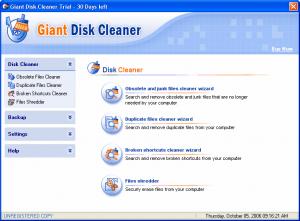
Giant Disk Cleaner is an application that has been specifically developed to remove obsolete and junk files, duplicate files and broken shortcuts that do nothing more than to burden your system and cause it to act sluggish. By removing these files Giant Disk Cleaner frees up much needed disk space and helps your system run smoothly.
That is not all Giant Disk Cleaner does. The application can also secure files from your computer. The application’s “Files shredder” feature will remove files so that no data recovery tool can bring them back to life. Furthermore, Giant Disk Cleaner comes with a feature that lets you easily restore backups.
Using Giant Disk Cleaner is a fairly straightforward process. The application comes with a simple, easy to use interface that should not pose a problem to any user, not even the novice user. If you can’t figure something out, a trip to the Help section will surely answer all your questions.
Before you go get Giant Disk Cleaner and put it to the test, take a look at the technical bits and pieces presented below:
Download – the download weighs in at some 2.3MB, which is good news. It means that even on a less than spectacular internet connection, it will take very little time for the download to complete. To my mind, it is always nice when you don’t have to wait a long time for a download to complete.
Installation – to install the application you need only follow the steps presented by the setup wizard. During the installation process you are asked if you would like to create a desktop shortcut, but you are not asked if you would like to select the directory where Giant Disk Cleaner will be installed.
At the time of writing this and according to the developer, Giant Disk Cleaner provides support for the following versions of the Microsoft-developed Windows operating system: Windows 98, ME, 2000, XP, Vista, and Windows 7.
Limitations – you can use the trial version of Giant Disk Cleaner free of charge for a period of 15 days. Once the trial period is over, you’ll need to get a license if you want to keep using the application. Speaking of which, it must be said that if you get a license within the first 5 days of the trial period, you get a $5 discount.
Pros
Cons
About Giant Matrix
Software developer Giant Matrix is a leading provider of system utilities and security software solutions. As the developer explained, its goal is to “deliver the best and most innovative software applications for Windows users”; Giant Matrix is committed to “continually enhancing the value of its solutions through software research, development and superior customer support.” Giant Matrix puts the user first, that is why it offers user friendly system utilities and security software solutions created with carefully chosen state-of-the-art technology.
Additional details about Giant Matrix and its products are available here.
Additional details about Giant Disk Cleaner are available here.
Giant Disk Cleaner is an application that has been specifically developed to remove obsolete and junk files, duplicate files and broken shortcuts that do nothing more than to burden your system and cause it to act sluggish. By removing these files Giant Disk Cleaner frees up much needed disk space and helps your system run smoothly.
That is not all Giant Disk Cleaner does. The application can also secure files from your computer. The application’s “Files shredder” feature will remove files so that no data recovery tool can bring them back to life. Furthermore, Giant Disk Cleaner comes with a feature that lets you easily restore backups.
Using Giant Disk Cleaner is a fairly straightforward process. The application comes with a simple, easy to use interface that should not pose a problem to any user, not even the novice user. If you can’t figure something out, a trip to the Help section will surely answer all your questions.
Before you go get Giant Disk Cleaner and put it to the test, take a look at the technical bits and pieces presented below:
Download – the download weighs in at some 2.3MB, which is good news. It means that even on a less than spectacular internet connection, it will take very little time for the download to complete. To my mind, it is always nice when you don’t have to wait a long time for a download to complete.
Installation – to install the application you need only follow the steps presented by the setup wizard. During the installation process you are asked if you would like to create a desktop shortcut, but you are not asked if you would like to select the directory where Giant Disk Cleaner will be installed.
At the time of writing this and according to the developer, Giant Disk Cleaner provides support for the following versions of the Microsoft-developed Windows operating system: Windows 98, ME, 2000, XP, Vista, and Windows 7.
Limitations – you can use the trial version of Giant Disk Cleaner free of charge for a period of 15 days. Once the trial period is over, you’ll need to get a license if you want to keep using the application. Speaking of which, it must be said that if you get a license within the first 5 days of the trial period, you get a $5 discount.
Pros
- Lightweight download
- Easy to use
- Remove obsolete and useless files
- File shredder
- Works with Windows 7
- Discount if you purchase within the first 5 days of the trial period
Cons
- Can’t select the directory where the application will be installed
- Automatically opens this webpage once the installation process is complete
About Giant Matrix
Software developer Giant Matrix is a leading provider of system utilities and security software solutions. As the developer explained, its goal is to “deliver the best and most innovative software applications for Windows users”; Giant Matrix is committed to “continually enhancing the value of its solutions through software research, development and superior customer support.” Giant Matrix puts the user first, that is why it offers user friendly system utilities and security software solutions created with carefully chosen state-of-the-art technology.
Additional details about Giant Matrix and its products are available here.
Additional details about Giant Disk Cleaner are available here.
Do you like Giant Disk Cleaner
Advertising
Popular News
The “Who Touched my Phone” app will show you who snooped on your iPhone while you were away.
The Suspend Background Tabs add-on will prevent background tabs from running periodical actions, thus improving the browser’s performance and preventing unnecessary CPU load.
Giant Disk Cleaner Awards
Giant Disk Cleaner Editor's Review Rating
Giant Disk Cleaner has been reviewed by George Norman on
08 Oct 2010. Based on the user interface, features and complexity, Findmysoft has rated
Giant Disk Cleaner
4
out of 5 stars, naming it ExcellentYour Rating
Top Downloads
2.
Opera5.
Trillian8.
AIM9.
Skype10.
Ad-Aware12.
Nero13.
Google Earth14.
Picasa15.
Winamp16.
iTunes17.
RealPlayer18.
uTorrent19.
eMule20.
WinRAR21.
BitComet22.
WinZip23.
Shareaza24.
CCleaner25.
Recuva26.
Tweak UI27.
CuteFTP Home29.
Adobe Reader30.
NewsPiperBecome A Fan!
Link To Us!
Giant Disk Cleaner
HTML Linking Code
HTML Linking Code
Latest Reviews



